
OpenAI has added presentations to ChatGPT. ChatGPT Slides, announced in OpenAI’s release notes on October 16, 2026, lets you build a slide deck from a conversation, your files or an outline, edit it with your team in real time, present it inside ChatGPT and export it to PowerPoint, PDF or Google Slides. It puts ChatGPT in direct competition with presentation tools many small businesses already pay for, including Gamma and Canva. Here is what ChatGPT Slides does, who can use it today, its limits at launch and whether it should change the tools you use.
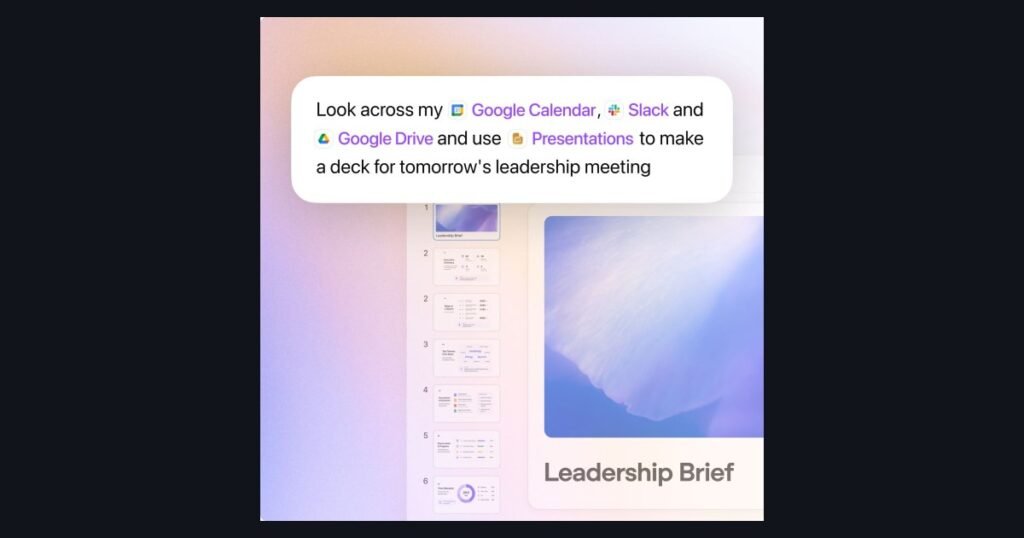
ChatGPT’s business workspace, where Slides now lives inside Space. Source: OpenAI, official image.
What Launched
On October 16, 2026, OpenAI announced ChatGPT Slides in its ChatGPT release notes. According to OpenAI, ChatGPT Slides lets you create presentations and keep working on them with your team in Space, the shared workspace OpenAI introduced on September 29.
The key points from OpenAI’s release note:
- Start from almost anything: a ChatGPT conversation, uploaded files or an outline. You can also share an example deck so ChatGPT follows its style and layout.
- Edit directly or with AI: change text, images, shapes and charts yourself, or ask ChatGPT to make the change.
- Collaborate in Space: teammates work on the same deck together.
- Export from the web: to PowerPoint, PDF or Google Slides.
- Availability: rolling out to eligible Pro, Business and Enterprise users with Space access, on the web and in the desktop app.
The same release notes entry also announced an update to the GPT-6 Pro model for eligible Pro users, with faster responses, better tool use and multiple agents working on different parts of a task in parallel.
ChatGPT Slides is the third piece of what is starting to look like an AI-first office suite inside ChatGPT. On September 29, OpenAI launched Space, which it describes as bringing your Pages, files and related work together in ChatGPT, along with collaborative Pages for documents. Slides arrived 17 days later.
How ChatGPT Slides Works
Based on OpenAI’s release notes and TechRepublic’s walkthrough published on October 19, the basic workflow is:
- Start a deck. OpenAI’s release note suggests asking ChatGPT in Work to create a presentation in Space. You can also start from a conversation, attached files, an outline or a template, or choose Create, then Slide in Space and pick a blank presentation or template.
- Give clear instructions. Say who the audience is, what the deck is for, how many slides you want and what source material to use.
- Share a style reference if you have an existing deck whose look you want to match.
- Edit. Select a specific element, such as a chart or text box, and request an edit, or use the prompt bar for broader changes. You can edit text, images, shapes, tables and charts directly, generate custom images or add your own.
- Collaborate. People with edit access can work on the deck in real time and leave shared comments. You can also mention ChatGPT inside a deck to ask for changes.
- Present or export. Run the slideshow from ChatGPT, or export to PowerPoint, PDF or Google Slides from the web. In the desktop app, decks can open in PowerPoint or Keynote if they are installed.
ChatGPT Slides is separate from the existing ChatGPT add-in for PowerPoint, which works as a sidebar inside PowerPoint itself. Slides builds and stores the deck inside ChatGPT, then exports it when you need a file.
Who Can Use It
ChatGPT Slides is not available to everyone yet. According to OpenAI:
- It is rolling out to eligible Pro, Business and Enterprise users.
- You need Space access, which OpenAI lists for eligible Pro, Business and Enterprise users on the web and in the desktop app. A paid plan alone may not be enough during the rollout.
- In managed workspaces, sharing follows your organization’s settings, and OpenAI describes Enterprise sharing in Space as an opt-in preview.
- Free, Go and Plus users have not been given a date.
For a small business, that effectively means ChatGPT Business or a personal Pro plan. If you are on Plus today, ChatGPT Slides is not a reason to upgrade on its own until you have checked whether your account would actually get access. Our ChatGPT review explains what each plan includes and what it costs.
Limitations at Launch
As with most first releases, ChatGPT Slides has some rough edges. Reported limits include:
- Windows 10 desktop users get files, not collaborative decks. Reports from TechRepublic and The Decoder say that on Windows devices without a required desktop component, the ChatGPT app creates and edits decks as local PowerPoint files instead. Windows 10 does not support the component, and Windows 11 may need an update or an administrator to enable it. The workaround is to use ChatGPT in a web browser.
- No comment-only sharing yet. Only people with edit access can collaborate and comment.
- Export fidelity varies. OpenAI recommends checking content and formatting after export, especially detailed layouts, charts, unusual fonts and strict corporate templates.
- Font choice differs by app. The web version shows browser fonts, while the desktop app can use fonts installed on your computer.
- Staged rollout. Eligible accounts may not see the feature right away.
As with any AI-generated content, check every number, chart and claim before you present it. AI tools can produce confident slides with wrong figures.
ChatGPT Slides vs Gamma and Canva
The obvious question for a small business is whether ChatGPT Slides replaces the presentation tools you already use. At launch, the honest answer is: not yet, but it changes the calculation for some teams.
| ChatGPT Slides | Gamma | Canva | |
|---|---|---|---|
| Where it lives | Inside ChatGPT Space | Gamma app | Canva editor |
| Best at | Turning a conversation or files you already have in ChatGPT into a deck | Fast, polished first drafts from a prompt or document | On-brand design across decks, social posts and print |
| Collaboration | Real-time editing and comments for edit-access users | Team workspaces | Real-time co-editing, comments and Brand Kits |
| Export | PowerPoint, PDF, Google Slides (web) | PowerPoint, PDF and more | PowerPoint, PDF and more |
| Who can use it | Eligible Pro, Business and Enterprise users with Space access | Free plan available, paid plans for more credits | Free plan available, paid plans for more AI and brand tools |
| Our score | Not yet reviewed | 7.5 / 10 | 8.5 / 10 |
Gamma and Canva details from our own reviews. ChatGPT Slides details from OpenAI’s October 16, 2026 release notes and launch coverage. We have not yet tested ChatGPT Slides ourselves.
Where ChatGPT Slides has an edge: if your research, notes and files already live in ChatGPT, turning them into a deck without copying anything into another app is genuinely convenient. Teams already paying for ChatGPT Business may be able to drop a separate presentation subscription for internal decks.
Where Gamma still leads: Gamma is built for presentations first and is fast at turning a prompt or long document into a polished, designed deck, and it has a free plan. Our Gamma review covers its credit system and export quirks, and our how-to guide for Gamma walks through the workflow.
Where Canva still leads: design control and brand consistency. If your decks need to match your logo, fonts and colors exactly, and you also make social posts, flyers and print materials, Canva’s Brand Kits and templates are hard to beat. See our Canva AI review for details.
What It Means for Small Businesses
ChatGPT Slides is part of a clear trend: the big AI assistants are moving into the everyday documents and decks that small businesses produce, rather than sitting in a separate chat window. Here is how to approach it:
- If you already pay for ChatGPT Business or Pro: check whether Slides is showing in your account, then try it on one internal deck, such as a monthly update or a sales review. Compare the time it takes and the quality with your current tool before changing anything.
- If client-facing decks must look on brand: keep using Canva or Gamma for now, and treat ChatGPT Slides as a drafting tool you export and polish elsewhere.
- If your team uses Windows 10: use ChatGPT in the browser for Slides, or plan your Windows 11 upgrade before relying on the desktop app.
- If you are on Plus or Free: wait. There is no date for those plans, and the current presentation tools already do this well.
- Whatever tool you use: check every figure and claim before you present. Our step-by-step guide to AI for small business covers how to set simple review rules for AI-generated work.
We will test ChatGPT Slides properly once it reaches our account and update our ChatGPT review with the results.
FAQ
Sources and References
- OpenAI: ChatGPT release notes, entries for September 29 and October 16, 2026.
- TechRepublic: How to make PowerPoint presentations with ChatGPT Slides, October 19, 2026.
- The Decoder: ChatGPT Slides has shipped, but on Windows 10 the desktop app gives you a PowerPoint file, October 19, 2026.
- Superpower Daily: OpenAI adds collaborative slide decks to ChatGPT.
Deciding which ChatGPT plan your business needs in the first place? Read our full ChatGPT review for pricing, real use cases and an honest verdict.

Start the discussion