
This ChatGPT review looks at the AI assistant nearly every small business owner has already tried, and the one OpenAI itself is now actively courting with a dedicated small-business program. This ChatGPT review looks past the hype and the horror stories alike to answer the only question that matters for a small business: is the paid tier actually worth it, and which one.
The same product holds a 4.7 out of 5 on G2 and a 1.6 out of 5 on Trustpilot. Both numbers are real.
On this page
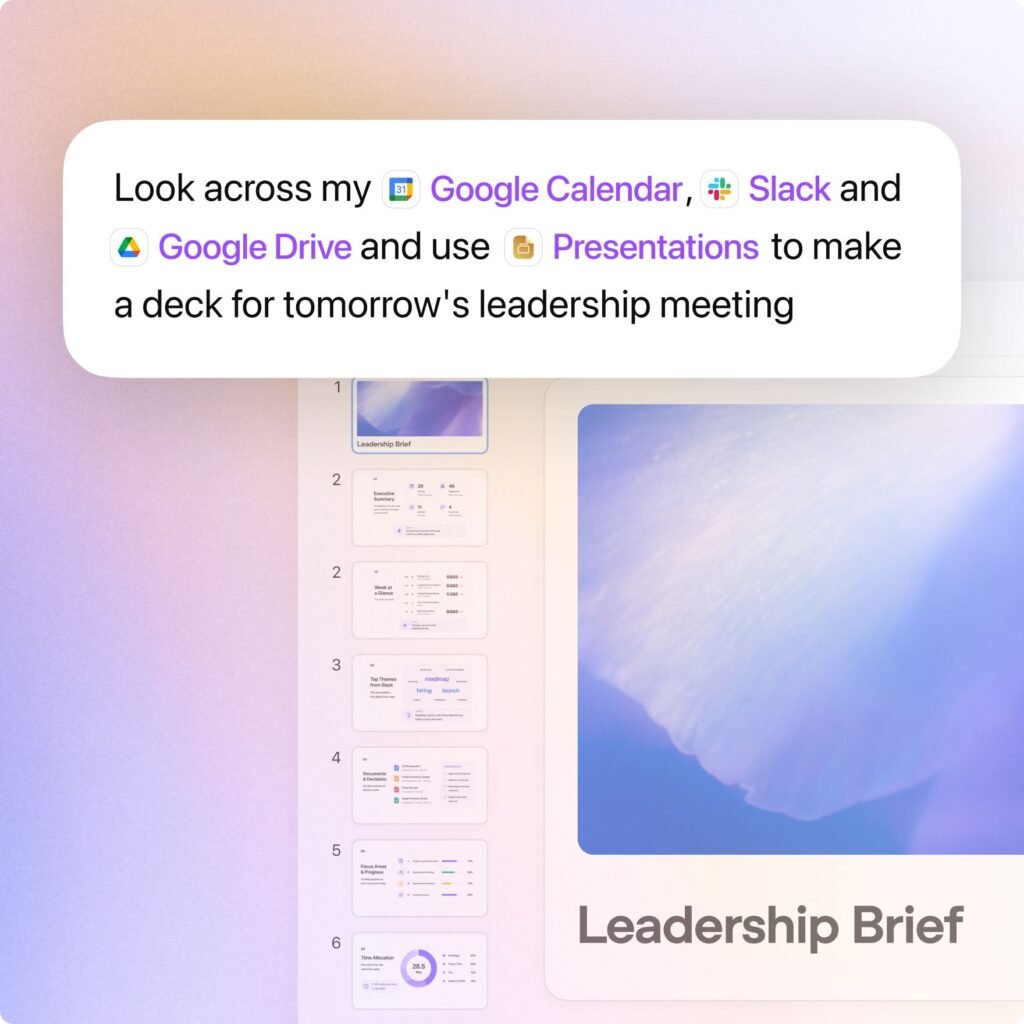
ChatGPT Business: a shared workspace built around ChatGPT Work and Codex. Source: OpenAI.
Executive Summary
ChatGPT is OpenAI’s AI assistant, launched November 30, 2022, and now the most widely used consumer and business AI product in the world: 900 million weekly active users and 50 million paying subscribers as of February 2026. In July 2026, OpenAI released GPT-5.6, the model family now powering ChatGPT across three tiers, Sol (flagship), Terra (balanced), and Luna (fast), alongside a new agentic mode called ChatGPT Work that turns a goal into a finished spreadsheet, slide deck, document, or small web app rather than just a chat reply.
On July 21, 2026, OpenAI launched a dedicated ChatGPT for Small Business program: free webinars, in-person AI academies across the US, and partner integrations with Dropbox, Shopify, Intuit, Slack, Atlassian, and Wix aimed specifically at owners running lean teams. That is a real signal about where OpenAI sees its next growth market, and a good reason to look at what small businesses actually get for their money.
Who this ChatGPT review is for: small business owners and teams deciding between ChatGPT’s Plus, Business, and Enterprise tiers, and anyone weighing ChatGPT against Claude, Gemini, or Perplexity for day-to-day business use.
Quick Verdict
| Category | Rating / Notes |
|---|---|
| Overall Rating | 8 / 10 |
| Ease of Use | 8 / 10, the chat interface is simple, Work and Codex add real depth for those who need it |
| Features | 9.5 / 10, the broadest feature set of any AI assistant: Work, Codex, Deep Research, Voice, Projects, Sites, GPTs |
| AI Capabilities | 9 / 10, GPT-5.6 Sol posts strong agentic and reasoning benchmarks |
| Customer Support | 4 / 10, a stark divide between G2 (4.7/5) and Trustpilot (1.6/5) |
| Integrations | 9 / 10, 60-plus Plugins including Slack, Gmail, Google Drive, Salesforce, Shopify |
| Automation | 8.5 / 10, ChatGPT Work genuinely completes multi-step deliverables, not just drafts |
| Value for Money | 7 / 10, Free through Plus is generous, Business seat pricing and limits need reading carefully |
| Scalability | 8.5 / 10, Business scales to 200 seats, Enterprise beyond that with SCIM and data residency |
| Best For | Small businesses that want one AI assistant covering writing, research, coding, and agentic task completion, with official onboarding support |
What Is ChatGPT?
OpenAI, founded in 2015, released ChatGPT to the public on November 30, 2022, and it became the fastest-growing consumer application in history at the time. The product has evolved from a single chat window into three distinct modes: Chat (everyday conversation), Work (multi-step agentic tasks that produce finished deliverables), and Codex (software development), all unified into one desktop and mobile app as of July 2026.
The current model family, GPT-5.6, launched July 9, 2026 in three tiers: Sol (the flagship, available to Plus, Pro, Business, and Enterprise), Terra (balanced, default for Business), and Luna (fast, default for Free and Go). A new “ultra” reasoning mode lets Sol delegate work to parallel sub-agents for complex tasks, and OpenAI has said Sol is roughly 54 percent more token-efficient on agentic coding work than its predecessor. Enterprise plans get a 1.5 million token context window, close to four times the prior generation’s ceiling.
On July 21, 2026, OpenAI launched the ChatGPT for Small Business program: free virtual training webinars covering accounting, marketing, and ecommerce use cases, in-person AI academies across the US, interactive getting-started guides, and partner integrations with Dropbox, Shopify, Intuit, Slack, Atlassian, and Wix. OpenAI reported that participants in a prior version of this program built a functional AI workflow in a single day 78 percent of the time, and that 42 percent saved more than five hours a week.
Key Features
Chat (Standard Conversation)
The core experience: text conversation, file uploads, image generation, and voice, with memory that carries context across sessions.
ChatGPT Work (Agentic Task Completion)
Launched July 9, 2026. Give it a goal and Work gathers context across connected apps, breaks the job into steps, and hands back a finished spreadsheet, slide deck, document, or small web app rather than a chat reply. Plan mode lets you approve a step-by-step plan before it starts, with configurable check-ins along the way.
Codex (Software Development)
Works across an existing codebase to implement features, fix bugs, run tests, and prepare a reviewed pull request. As of July 2026 it is built directly into the same desktop app as Chat and Work rather than a separate application.
Deep Research
A research agent that runs multi-step web research and returns a cited report. Plus includes 10 runs a month, Pro includes 250.
Projects and Company Knowledge
Projects group files, chats, and custom instructions around a specific piece of work, up to 40 files on Business seats. Company Knowledge lets a workspace ground answers in its own connected documents and data.
Plugins (formerly the App Directory)
More than 60 integrations, including Slack, Microsoft Teams, Google Drive, Gmail, SharePoint, Salesforce, GitHub, Figma, Canva, Dropbox, and Zoom, so Work can act across the tools a business already uses instead of staying inside the chat window.
User Experience
Interface: the July 2026 desktop app rebuild merged Chat, Work, and Codex into one Mac and Windows application (the prior app is now called ChatGPT Classic), which several early reviewers noted added real complexity to what used to be a single, simple chat window.
Learning curve: low for basic chat, meaningfully higher for Work’s plan-approval and check-in workflow and for connecting Plugins correctly the first time.
Mobile and voice: full-featured mobile apps with Advanced Voice, and on Apple Silicon Macs a Messages plugin (added August 20, 2026) that can read and reply to iMessage, SMS, and RCS.
Independent trackers of ChatGPT complaints document a recurring pattern worth knowing before relying on it for client-facing work: users report Projects occasionally failing to read newly uploaded files, regenerating answers from stale context, or dropping replacement uploads. This is not universal, but it is documented enough to be worth a backup habit, not a footnote.
AI Performance
Model quality: GPT-5.6 Sol’s “ultra” mode, which delegates work across parallel sub-agents, reportedly reached a 91.9 percent success rate on one agentic benchmark, described by testers as the highest public score recorded at the time. OpenAI also reports the tool-call refusal rate on agent benchmarks dropped below 4 percent, down from roughly 12 percent on GPT-5.5.
Reliability record: ChatGPT has had multiple significant outages through 2026, including a multi-day disruption during a peak usage period. Community trackers have logged dozens of incidents across a 90-day window, alongside periods of stable, high-availability service. Treat any single uptime figure as a snapshot, not a guarantee, and check OpenAI’s own status page before a client-facing deadline.
Model volatility: three model generations were retired in the four months from March to July 2026 alone. A prompt or workflow tuned for one named model may behave differently after the next release, which is a genuine operational cost for a business that has built processes around ChatGPT.
Real Business Use Cases
Marketing: turning campaign briefs and notes into launch-ready assets, then having ChatGPT Work monitor campaign performance and update the plan as results come in, per OpenAI’s own marketing use-case guidance.
Finance and bookkeeping: preparing month-end close or budget forecasts by pulling data across systems, building models, and creating live-updating dashboards through Sites, rather than manually stitching spreadsheets together.
Operations: pulling data from project-management tools, planning docs, and recent messages to prepare for reviews, suggest next steps, and assign owners.
Documented small-business results: OpenAI cites a coffee retailer, Plex Coffee, cutting internal staff messages on routine issues by more than half, and a digital media company, HYGH, saving 5.5 hours per employee each week by launching internal tools in days instead of months. These are OpenAI’s own customer stories, not independently audited, but they describe the kind of task ChatGPT Work is actually built for.
Pricing Analysis
Confirm current numbers at chatgpt.com/pricing before purchasing; OpenAI has changed Business pricing twice in 2026 alone.
| Plan | Price | Notes |
|---|---|---|
| Free | $0 | GPT-5.6 Luna, unlimited text chats, ads, tight limits on images/voice/Deep Research |
| Go | $8/mo | More usage than Free, still ad-supported, missing most advanced features |
| Plus | $20/mo | GPT-5.6 Sol, ad-free, Work, Codex, Sora, 10 Deep Research runs/mo |
| Pro | $100/mo or $200/mo | Higher usage ceilings, 250 Deep Research runs/mo on the $200 tier, priority compute |
| Business (Standard seat) | $20/seat/mo annual, $25 monthly | Minimum 2 seats, maximum 200 seats as of Aug 24 2026, no training on your data by default, SSO, SOC 2, ISO 27001 |
| Business (Premium seat) | $100/seat/mo annual, $125 monthly | 5x the usage of Standard seats, no 5-hour usage limit, mixable with Standard seats in one workspace |
| Enterprise | Custom | SCIM provisioning, role-based access control, IP allowlisting, data residency, dedicated success manager |
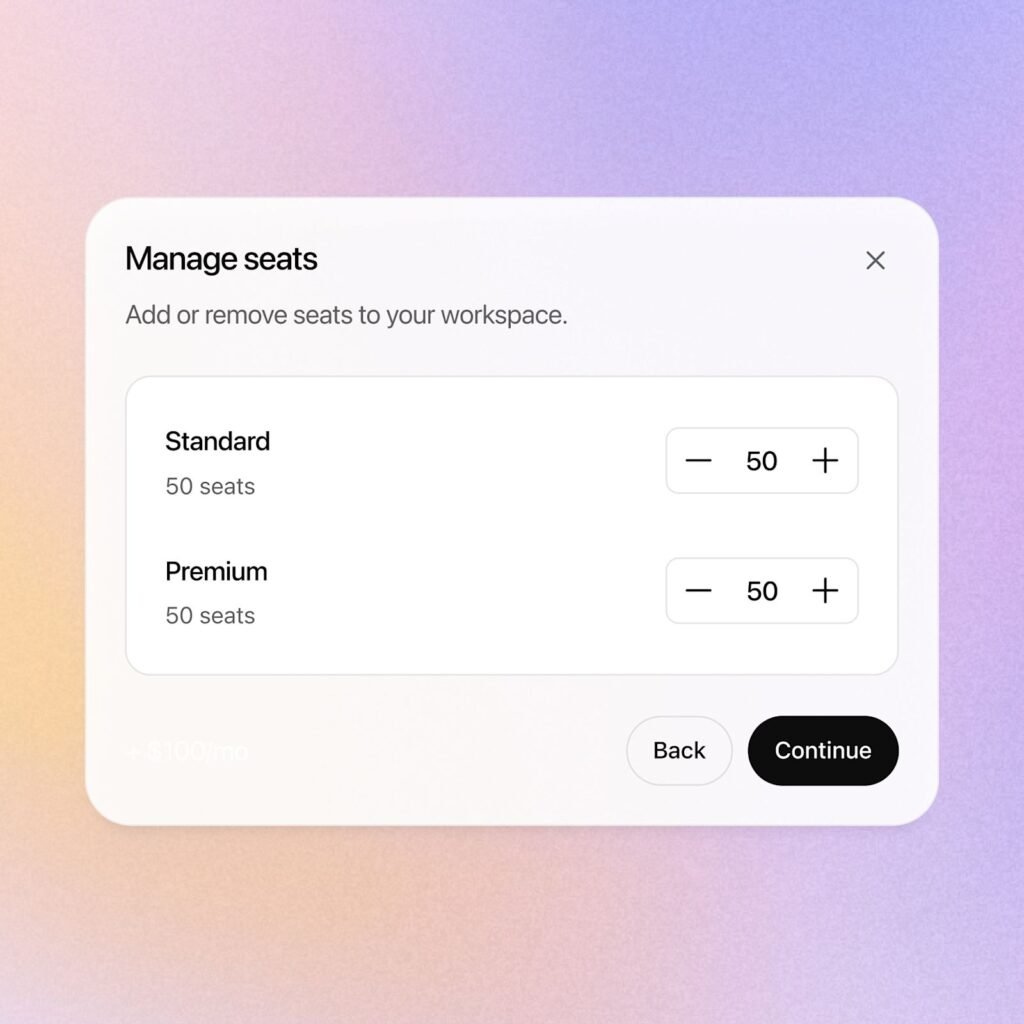
Mixing Standard and Premium seats in one ChatGPT Business workspace. Source: OpenAI.
ChatGPT Business (renamed from ChatGPT Team in August 2025) was cut from $25 to $20 per seat on annual billing, and $30 to $25 monthly, effective April 2, 2026, bringing it to price parity with Plus at the entry tier. A workspace requires a minimum of 2 paid seats and, as of August 24, 2026, a maximum of 200 combined Standard and Premium seats before a business needs to move to Enterprise. For a small business, the practical decision usually comes down to one question: does your team need the contractual no-training-on-your-data guarantee and admin controls that Business provides over Plus’s opt-out toggle? At exactly two seats, Business costs no more than two individual Plus subscriptions and adds real governance on top.
Pros and Cons
Pros
- The broadest feature set of any consumer-accessible AI assistant: chat, agentic Work tasks, coding, research, voice, and image generation in one product
- GPT-5.6 Sol posts genuinely strong agentic benchmarks, with a reported sub-4-percent tool-call refusal rate
- A dedicated small-business program with free training, in-person academies, and named partner integrations
- 60-plus Plugins connect Work to the tools a small business already runs on: Slack, Gmail, Google Drive, Shopify, Salesforce
- Business seats undercut most competitors on a per-seat basis after the April 2026 price cut
- No training on workspace data by default at the Business tier, with SOC 2 and ISO 27001 compliance
- Massive install base (900 million weekly users) means abundant tutorials, integrations, and community troubleshooting
Cons
- Customer support and reliability draw sharply divided reviews: 4.7/5 on G2 versus 1.6/5 on Trustpilot from nearly 2,800 reviews
- Documented outages through 2026, including a multi-day disruption during peak usage
- Model churn is genuinely disruptive: three model generations retired between March and July 2026 alone
- The July 2026 desktop app rebuild merged Chat, Work, and Codex into one interface, which added real complexity for users who only wanted simple chat
- Documented reports of Projects failing to read newly uploaded files or reverting to stale context on multi-file work
- Premium seat pricing and the Standard/Premium mix adds a genuine layer of purchasing complexity to what used to be one flat per-seat price
Comparisons
ChatGPT vs. Claude
| ChatGPT Business | Claude Team | |
|---|---|---|
| Starting business price | $20/seat/mo (annual) | $25/seat/mo (annual, Team plan) |
| Standout strength | Broadest feature set: Work, Codex, Deep Research, voice, Plugins | Longer context recall and repository-scale coding, per independent benchmarks |
| Best for | Small businesses wanting one assistant across many task types | Teams doing heavy document review or large codebase work |
Bottom line: one published comparison found GPT-5.6 delivers agent execution and business automation nearly on par with Claude at a lower operational cost, while Claude keeps an edge on massive-context recall and repository-scale coding tasks. For a small business without a dedicated engineering team, ChatGPT’s broader out-of-the-box feature set is usually the more practical starting point.
ChatGPT vs. Perplexity
Perplexity, reviewed separately on this site, is a narrower, faster tool built specifically for cited, research-style answers, and it is a genuinely strong pick for that single job. ChatGPT covers the same research use case through Deep Research, then adds agentic task completion, coding, and image generation on top, at the cost of a more complex product to learn.
ChatGPT vs. Google Gemini
Gemini’s advantage is depth of integration inside Google Workspace, which matters most for a business already standardized on Gmail, Docs, and Sheets. ChatGPT’s Plugins directory now reaches many of the same tools independently, so the deciding factor is usually which ecosystem a team already lives in rather than a clear capability gap either way.
Performance Testing
Independent evidence, not invented for this review, reports the following:
- GPT-5.6 Sol in ultra mode was reported to reach a 91.9 percent success rate on one agentic benchmark, described as the highest public score recorded at the time.
- OpenAI reports the tool-call refusal rate on agent benchmarks fell below 4 percent, down from roughly 12 percent on GPT-5.5.
- G2 shows a 4.7 out of 5 rating from over 2,000 reviews, with 83 percent five-star, concentrated among business users evaluating it as a productivity tool.
- Trustpilot shows a 1.6 out of 5 rating from nearly 2,800 reviews, with 73 percent one-star, concentrated among consumers reporting billing disputes, support failures, and model-quality complaints.
- Community outage trackers documented multiple significant incidents through 2026, including a multi-day disruption during a peak usage period.
The G2-versus-Trustpilot gap is not a contradiction so much as two different populations rating two different experiences: professional teams using it as intended report high satisfaction, while consumers hitting billing or support friction are far more likely to leave a review at all.
Security and Privacy
Per OpenAI’s own Business page: data submitted through ChatGPT Business is never used to train OpenAI’s models by default, and everything is encrypted, with SSO, multi-factor authentication, and support for GDPR and CCPA compliance. Business also carries SOC 2 Type 2 and ISO/IEC 27001, 27017, 27018, and 27701 certifications. Enterprise adds SCIM provisioning, role-based access control, IP allowlisting, audit logs, data residency options, and a HIPAA BAA option for regulated industries.
The practical gap for a small business is between Free/Plus and Business: individual plans use an opt-out toggle for model training, while Business makes no-training the default. A business handling any client-confidential material should treat that distinction as the real dividing line, not a footnote, when deciding whether Plus is actually sufficient.
Customer Support
Documentation: an extensive OpenAI Help Center, in-app support, and for the small-business program specifically, free webinars and in-person academies with direct access to the OpenAI Academy team.
Independent reputation: this is ChatGPT’s most divided category. G2’s 4.7/5 from business-focused reviewers sits alongside Trustpilot’s 1.6/5 from nearly 2,800 largely consumer reviews, with recurring complaints about slow support responses, billing disputes, and account access issues. Community-run complaint trackers have also logged specific, repeatable failure modes: Projects occasionally regenerating answers from stale files, or dropping newly uploaded replacements.
To manage the risk: for any client-facing or billing-sensitive use, keep work inside a Business workspace with admin visibility rather than an individual Plus account, and treat OpenAI’s status page, not Reddit sentiment, as the source of truth during an active incident.
Common Mistakes
- Running client-confidential work through an individual Plus account instead of a Business workspace, missing the contractual no-training guarantee Business provides by default.
- Buying Premium seats for an entire team without checking whether most of the workload actually needs 5x the usage ceiling Standard seats already provide.
- Building a prompt library or workflow around a specific named model, then being surprised when that model retires a few months later.
- Assuming ChatGPT Work’s output is client-ready without a human review pass, especially on financial or legal material.
- Treating a single online review score as the full picture, given how far G2 and Trustpilot diverge for this exact product.
Expert Tips
- Start with two Business seats rather than several individual Plus accounts once more than one person on the team needs the tool; at that size the cost is identical and Business adds real admin control.
- Use Plan mode in ChatGPT Work for anything client-facing, so you approve the step-by-step approach before it starts rather than reviewing only the finished output.
- Sign up for OpenAI’s small-business webinars before committing to a paid tier; they are free and cover specific accounting, marketing, and ecommerce workflows.
- Keep a second copy of any file you’re actively editing inside a Project, given documented reports of stale-file and re-upload issues on multi-file work.
- Re-test any production prompt or workflow after a named model retirement, rather than assuming behavior carries over unchanged.
Rolling ChatGPT Out in Your Business
Decided on ChatGPT? Our guide AI for Small Business: How to Use AI Step by Step walks through the rollout: choosing your first use cases, setting up a business workspace with training off, the CRAFT prompting method, a copyable prompt library, an AI use policy template, and an ROI calculator to prove the time savings.
Frequently Asked Questions
Is ChatGPT good for small businesses?
Yes, especially since OpenAI launched a dedicated ChatGPT for Small Business program in July 2026 with free training and small-business-specific partner integrations. The broad feature set covers most day-to-day tasks a lean team needs without buying several separate tools.
How much does ChatGPT cost for a small business?
Individual plans run Free through Plus at $20/mo. For a team, ChatGPT Business costs $20 per seat per month on annual billing (2-seat minimum), with an optional $100 per seat Premium tier for heavier usage. Confirm current pricing at chatgpt.com/pricing.
Is ChatGPT Business worth it over Plus?
For a single user, Plus is usually enough. Once a second person needs access, Business costs the same per seat as two Plus accounts and adds a contractual no-training-on-your-data guarantee, admin controls, and SSO that Plus does not.
Is ChatGPT reliable?
Model quality and agentic performance are strong by most published benchmarks, but the product has a genuinely divided reliability and support reputation: 4.7/5 on G2 versus 1.6/5 on Trustpilot, plus documented outages through 2026. It is best treated as very capable but not immune to downtime.
What is ChatGPT Work?
An agent mode launched July 9, 2026 that takes a goal, gathers context across your connected apps, and returns a finished deliverable, a spreadsheet, slide deck, document, or small web app, rather than a chat reply.
Is ChatGPT still worth it in 2026?
Yes, for a small business that wants one AI assistant covering writing, research, and now genuine task automation, backed by OpenAI’s own small-business onboarding program. Teams needing the absolute largest context window or deepest codebase understanding should also evaluate Claude before committing.
Final Verdict
The short version of this ChatGPT review: ChatGPT earns its position as the default AI assistant for small businesses in 2026: the feature set is the broadest in the category, GPT-5.6 Sol’s agentic performance is genuinely strong by published benchmarks, and OpenAI’s own small-business program, free training, in-person academies, and named partner integrations, is a real, useful signal that small teams are not an afterthought in this product’s roadmap.
The honest complication is the same one that shows up in the review scores: this is a product with a stark split personality between confident, well-supported business use and a documented pattern of consumer-side billing, support, and reliability complaints. Neither side of that split is invented, and a small business evaluating ChatGPT should plan around both: the tool is very capable, and it is not immune to an outage or a support ticket that takes longer than expected to resolve.
Who should buy it: small businesses wanting one AI assistant across writing, research, and genuine task automation, especially teams that will use the official small-business training resources to get real value from ChatGPT Work quickly.
Who should look elsewhere first: teams whose primary need is massive-context document review or deep, repository-scale coding work, where Claude has a documented edge, and any business for whom a fast, reliable support channel is a hard requirement.
ChatGPT in the News
New in October 2026: OpenAI launched ChatGPT Slides, which builds presentations from your chats and files, lets your team edit together in ChatGPT Space, and exports to PowerPoint, PDF or Google Slides.
Thinking about Notion AI instead of, or alongside, ChatGPT? See our Notion AI vs ChatGPT comparison for pricing, features and which one fits your team.
Sources and References
OpenAI, ChatGPT Business official page, chatgpt.com/business
OpenAI, Introducing the ChatGPT for small business program, openai.com/index/introducing-chatgpt-small-business-program
OpenAI Help Center, ChatGPT Business pricing and seat FAQ
Axios, MacRumors, Digital Applied: GPT-5.6 and ChatGPT Work launch coverage, July 2026
CheckThat.ai: ChatGPT G2 and Trustpilot review synthesis, 2026
Independent outage and complaint tracking sources cross-referenced for reliability history
OpenRush keyword and SERP data, pulled live for this review
Update: on August 31, 2026, OpenAI opened self-service ChatGPT Ads buying to small businesses worldwide. See our coverage of ChatGPT Ads hitting a $1 billion run rate for what that means if you advertise, or if your customers use the free plan.
Weighing ChatGPT against a citation-first research tool? See our full Perplexity AI Review, including an independent accuracy audit and the publisher lawsuits worth knowing about.
Update: on September 3, 2026, ChatGPT, Claude, and Grok all went down together in a shared Azure outage. See what it means for businesses relying on one AI tool.
Already living inside a workspace tool? See our full Notion AI Review, including the 2026 pricing change small businesses should know about.


Start the discussion