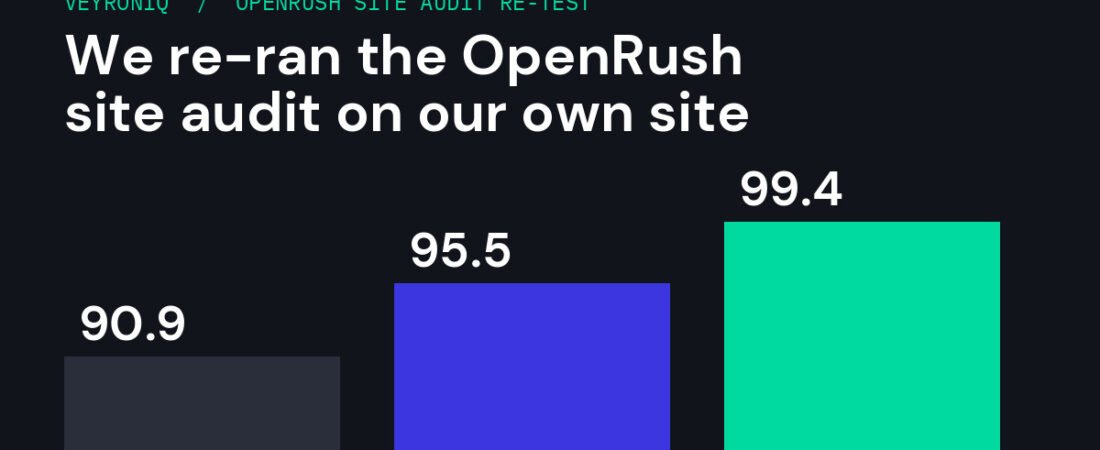
The OpenRush site audit failed completely the first time we tested it. OpenRush says it is fixed, so we re-ran it three times on our own website. Here is what the OpenRush site audit found, what turned out to be our own fault, what we fixed, and how our score went from 90.9 to 99.4 in one afternoon.
Tested
Nov 12, 2026
Runs
3
Score
90.9 to 99.4
Verdict
Now works
In this article
- Why We Re-Ran the Audit
- How the OpenRush Site Audit Works
- Run 1: It Works, With Nine Failed Fetches
- What Was Really Going On
- Run 2: Zero Failures and Better Detail
- What We Fixed
- Run 3: 99.4 Out of 100
- Is the OpenRush Site Audit Good Enough?
- What This Means for Our OpenRush Review
- Run Your Own Site Audit in 10 Minutes
- FAQ
- Sources
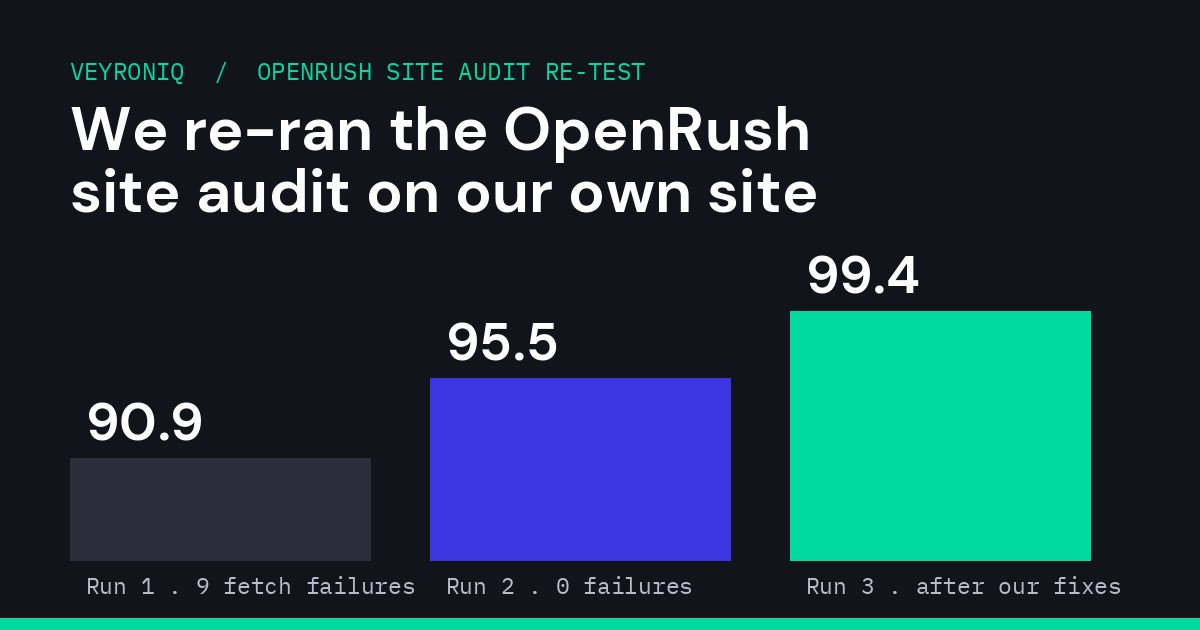
Our OpenRush site audit scores across three runs on November 12, 2026.
Why We Re-Ran the Audit
When we first reviewed OpenRush, one tool let us down: the full site audit returned a complete fetch failure on our own website. We said so in our OpenRush review, and it was one of the reasons we scored the product 7.5 out of 10 rather than higher.
This week OpenRush told us the site audit had been fixed, so we bought more credits and ran it again on veyroniq.com, the same site that failed last time. We ran it three times on November 12, 2026, fixed what it found in between, and checked every finding against our own server before writing this.
Here is the short version: the site audit now works, it runs in seconds, and it found real problems we fixed the same afternoon. It also has limits worth knowing, and one of its findings needed context that only we could supply.

OpenRush describes itself as the marketing data layer for AI agents. Image: OpenRush.
Results at a glance
| Run 1 | Run 2 | Run 3 | |
|---|---|---|---|
| How pages were chosen | OpenRush sampled 20 from our sitemap | We listed 20 pages | We listed 19 pages |
| Pages audited | 11 | 20 | 19 |
| Fetch failures | 9 | 0 | 0 |
| On-page score | 90.9 | 95.5 | 99.4 |
| Slow pages flagged | 10 | 5 | 0 |
| Main issues | Slow responses, failed fetches, short and long titles | Slow pages, missing alt text, titles, a thin Shop page | Only the thin Shop page |
How the OpenRush Site Audit Works
OpenRush is not a dashboard you log into. You connect it to an AI assistant (we use Claude) and ask a question such as “audit veyroniq.com”. The assistant calls OpenRush’s site audit tool and gets structured results back.
According to OpenRush’s own tool description, the audit:
- Samples pages from your sitemap, or from links on your homepage, picking one page per URL pattern and putting money and content pages first.
- Checks on-page tags, redirects, slow responses, broken internal links, top-level pages nothing links to, and conflicts with your sitemap.
- Skips pages meant to stay out of search, such as noindexed pages, and counts them separately.
- Audits up to 20 pages per run, or exactly the URLs you give it, which is useful for re-checking pages you have fixed.
- Ranks recommendations by what matters for search and marks cosmetic items such as alt text as “polish”.
- Reads raw HTML only. It does not run JavaScript or measure Core Web Vitals.
Every run we made came back in seconds.
Run 1: It Works, With Nine Failed Fetches
The first run is the one that failed completely in our original review. This time it worked. OpenRush found 88 pages in our sitemap, sampled 20 and audited 11. It gave us an on-page score of 90.9 with no high-severity issues.
It flagged:
- Slow responses on 10 of the 11 pages, between about 3.7 and 5.0 seconds. Our homepage came back in under 0.4 seconds.
- Nine pages it could not fetch at all, including our blog page, our Lindy review and, ironically, our OpenRush review.
- Short titles on our cookie policy, disclaimer and privacy policy pages (10 to 14 characters).
- A 76-character homepage title that Google would cut off.
- A thin product category page with 139 words.
Nine failed fetches out of 20 looked bad, so before blaming OpenRush or our hosting, we checked.
What Was Really Going On
We fetched the same URLs from our own server. Every one of them returned normally, and most loaded in about 0.35 seconds.
The difference was our page cache. Our site uses LiteSpeed Cache, which stores a ready-made copy of each page. Earlier that day we had been editing titles and pages across the site, and each round of edits cleared the whole cache. The first visitor to any page after a purge waits while WordPress builds it from scratch, which on our pages took around four seconds. A cached page loads in a fraction of that.
So OpenRush was reporting accurately: when it arrived, most of our pages really were slow, because they were not cached yet. The fetch failures were most likely the same problem taken further, with pages taking too long to build and the request timing out. We cannot prove that last part from our side, but every “failed” URL loaded normally once cached.
What this means for you
If you edit your site and clear your cache, the next visitor pays for it, and so does Googlebot if it arrives first. After a big update, visit your important pages yourself (or use your cache plugin’s crawler or preload feature) so they are cached before search engines and customers arrive.
Run 2: Zero Failures and Better Detail
For the second run we gave OpenRush a specific list of 20 pages: the nine that failed, our most important reviews and our main pages. This time every page was fetched successfully, the score rose to 95.5, and the report got more useful:
- Five pages were still slow (3.5 to 4.4 seconds). These were our ChatGPT, Hostinger, Base44 and Lovable reviews and our Notion 3.8 article, which had not been cached again yet. Pages that were cached loaded in 0.1 to 0.45 seconds.
- Ten pages had images with no alt text. OpenRush listed the exact image files, which made this quick to trace: they were the small thumbnails in the “Keep reading” boxes at the end of our articles.
- Two titles were too long and one was too short.
- Our Shop page was thin (136 words) and none of the other pages it checked linked to it.
On the alt text, context matters. Our related-post thumbnails had empty alt text on purpose: they sit inside a link that already contains the article title, and they are hidden from screen readers, so the empty alt avoided repeating the title. That follows accessibility guidance for decorative images. But because those images are hidden from screen readers anyway, adding the article title as alt text costs nothing for accessibility and gives image search more to work with. We added it.
One more thing we noticed: when we sent the exact same list of pages again a few minutes later, OpenRush returned the earlier result instead of re-crawling, with the same timestamp. If you want a fresh audit right after fixing something, change the page list slightly.
What We Fixed
Everything below took about 30 minutes, most of it waiting for pages to cache:
| Finding | What we did |
|---|---|
| Legal page titles too short | Rewrote them, for example “Privacy Policy: How VeyronIQ Collects and Uses Data” |
| Homepage title too long (76 characters) | Shortened it to “VeyronIQ |
| AI Setup page title too long (76 characters) | Shortened it to under 60 characters |
| No alt text on related-post thumbnails | They now use the article title as alt text |
| Eight media library images with no alt text | Added descriptions |
| Slow, uncached pages | Visited every published page so the cache was rebuilt |
We left the Shop page alone for now. It is a WooCommerce listing page that does not need to rank, and adding filler text would not help anyone. We will link to it properly when we expand our products.
Run 3: 99.4 Out of 100
The third run covered 19 pages, including all five that had been slow and every page whose title we changed. The on-page score went to 99.4, with no fetch failures, no slow pages and no title or alt text issues. Response times ranged from 0.14 to 0.40 seconds.
The only remaining finding was the Shop page, which we chose not to change.
Is the OpenRush Site Audit Good Enough?
For a small business, yes, with its limits in mind.
What it does well:
- It is fast. Each run came back in seconds.
- Findings come with evidence: the exact URL, title, word count, response time or image file. We could act on every one without guessing.
- You can audit exactly the pages you choose, which makes “fix, then re-check” easy.
- It ranks issues sensibly. Slow pages and failed fetches came first, and alt text was marked as polish.
- Because it works through an AI assistant, the same conversation that finds a problem can help you fix it.
What to keep in mind:
- It checks a sample, not your whole site. Up to 20 pages per run. That is fine for a small site, but larger sites will need several runs or a dedicated crawler.
- It reads raw HTML only. No JavaScript and no Core Web Vitals, so it will not tell you about layout shift or slow-loading images. Use Google PageSpeed Insights for that.
- Speed results are a snapshot. If your cache was just cleared, every page will look slow. That is accurate, but it can make a healthy site look worse than it usually is.
- Some findings need judgment. The alt text flag was technically right but not a real accessibility problem in our case.
What This Means for Our OpenRush Review
The biggest weakness in our original test, a site audit that failed completely, is fixed. We have updated our OpenRush review with these results.
We are keeping the score at 7.5 out of 10 for now. The audit is only one part of OpenRush, and the product has been adding a lot more lately, including Google Ads, Google Analytics and Search Console connections. We are testing those next for a fuller look at whether OpenRush is becoming a complete marketing intelligence tool rather than an SEO data provider. If the score changes, we will say so and explain why.
Run Your Own Site Audit in 10 Minutes
- Connect OpenRush to your AI assistant. OpenRush supports Claude, ChatGPT, Cursor and others through MCP, and you pay with prepaid credits rather than a subscription.
- Warm your cache first. If you have just made changes, visit your key pages so the results reflect what Google normally sees.
- Ask for an audit. For example: “Use OpenRush to audit mydomain.com, 20 pages.”
- Check failures before panicking. If pages fail or look slow, open them yourself. A page that loads fine on a second visit points to caching, not a broken site.
- Fix the top three issues, starting with anything marked medium or high.
- Re-audit just those pages. Ask OpenRush to audit the specific URLs you changed, and adjust the list slightly if you get the old result back.
PromptA prompt you can copy
For more on the basics, see our guides on how to get your website indexed by Google and how to get more organic traffic.
OpenRush Site Audit FAQ
Yes. In our original review the OpenRush site audit returned a complete fetch failure on our site. When we re-ran it on November 12, 2026, it worked on every run. The first run had nine failed fetches, which our own checks traced to pages that were not cached at the time, and the next two runs had none.
Up to 20 pages per run. It can sample pages from your sitemap, one per URL pattern, or audit exactly the URLs you list, which is useful for re-checking pages after you fix them.
It checks on-page tags such as titles and descriptions, redirects, slow server responses, broken internal links, top-level pages that nothing links to, thin content, image alt text and conflicts with your sitemap. It reads raw HTML only, so it does not run JavaScript or measure Core Web Vitals.
It measures how long your server takes to return each page at that moment. If you recently cleared your cache, pages are rebuilt on the first visit and can take several seconds. In our test, the same pages loaded in about 0.35 seconds once they were cached again.
Each of our three runs returned results in seconds.
For a small site, yes. It is fast, gives exact evidence for each issue and makes it easy to re-check fixes. Larger sites will need several runs or a dedicated crawler, and you should use Google PageSpeed Insights for Core Web Vitals.
Sources and References
Audit results come from our own three OpenRush runs on November 12, 2026, checked against our server. Descriptions of how the audit works come from OpenRush’s tool documentation.
Free newsletter
Get new AI reviews in your inbox
One email when we publish a new honest review or practical guide. No spam, unsubscribe in one click.




Start the discussion