
Notion spent a decade building the flexible workspace that replaced a dozen other apps for millions of teams, and it has now bet its next chapter entirely on AI agents. This Notion AI review looks at what changed in 2026, when the company quietly retired the cheap AI add-on nearly everyone used to buy, and folded the real AI experience into a pricier plan instead.
Notion’s official brand card. Source: Notion.
Executive Summary
Notion Labs, Inc. was founded in San Francisco in 2013 by Ivan Zhao and Simon Last, later joined by co-founders Chris Prucha, Jessica Lam, and Toby Schachman. After a near collapse in 2015, the team rebuilt the product from scratch and launched Notion 1.0 in 2016. It has since grown into one of the most widely used workspace tools available, with more than 100 million users, over 4 million paying customers, and reported adoption across roughly 62 percent of the Fortune 100. Notion has raised about 343 million dollars and was reported to have confidentially filed for an IPO in February 2026 at an 18.5 billion dollar valuation, with a possible public listing by late 2026 or 2027.
The product itself has shifted hard toward AI agents. Notion 3.0, launched September 2025, introduced Notion Agent, a personal assistant that can create pages, edit databases, and complete multi-step tasks inside your workspace. Notion 3.3, launched February 24, 2026, added Custom Agents, team-wide automations that run on schedules or triggers. The catch for anyone evaluating cost: as of 2026, Notion retired the old, cheaper standalone AI add-on for new customers and folded full AI access exclusively into the pricier Business plan.
Who this Notion AI review is for: small businesses and teams deciding whether Notion’s AI features are worth the jump to its Business tier, and whether the platform’s well-documented learning curve is worth the flexibility it buys.
Quick Verdict
| Category | Rating / Notes |
|---|---|
| Overall Rating | 7.5 / 10 |
| Ease of Use | 6 / 10, the block-based system is consistently cited as the steepest learning curve in this category |
| Features | 8.5 / 10, Notion Agent, Custom Agents, AI Meeting Notes, and Enterprise Search cover real ground |
| AI Capabilities | 7.5 / 10, genuinely useful once set up, built on GPT-4.1 and Claude 3.7 Sonnet under the hood |
| Customer Support | 7 / 10, no sharp G2-versus-Trustpilot split seen elsewhere in this category, but a real learning-curve complaint pattern |
| Integrations | 8.5 / 10, native MCP server plus partner integrations including Slack, Gmail, Linear, Figma, HubSpot, GitHub |
| Value for Money | 6.5 / 10, full AI now requires the pricier Business tier; Custom Agents add a separate credit cost on top |
| Scalability | 7.5 / 10, real performance complaints in very large workspaces (slower search, slower page loads) |
| Best For | Teams already living inside Notion for documentation and knowledge management who are ready to invest time building real workflows |
What Is Notion?
Notion is a block-based workspace where docs, wikis, databases, and project boards are all built from the same flexible unit, a block, that can be a paragraph, a to-do item, an embedded file, or a full database. That flexibility is Notion’s defining trait: teams build their own tools out of Notion’s primitives rather than adopting a rigid, predefined structure like Asana or Confluence impose.
The 2026 pivot is toward agents. Notion Agent, available to all paid AI users, works on demand: ask it to edit pages, update databases, or find a meeting time, and it uses your workspace and connected apps as context. Custom Agents, available on Business and Enterprise, run continuously in the background on schedules or triggers, for tasks like answering repeat questions in Slack, routing incoming work, or compiling a weekly status report. Notion’s own early data shows the scale of the shift: testers built more than 21,000 Custom Agents during the beta, and the company reports roughly 2,800 agents running internally at Notion itself.
Key Features
Notion Agent
A personal AI assistant built into every paid AI plan. It can create and edit pages, build or restructure databases, search your inbox and calendar when connected, and complete multi-step requests end to end rather than just answering a question.
Custom Agents
Team-wide automations available on Business and Enterprise. Three common patterns Notion highlights: Q&A agents that answer repeat questions from workspace knowledge, task-routing agents that triage incoming work, and status-update agents that compile recurring reports on a schedule.
AI Meeting Notes
Automatically captures and summarizes meetings into actionable notes stored directly in Notion.
Enterprise Search
Searches across Notion and connected apps like Slack, Google Drive, and GitHub from one place, so answers do not require jumping between tools.
Notion MCP and AI Connectors
A native Model Context Protocol server plus pre-built partner integrations, including Slack, Gmail, Linear, Figma, HubSpot, Ramp, Stripe, GitHub, Intercom, and Sentry, so agents can read and act across a business’s existing tools rather than staying siloed inside Notion.
Prompt Injection Protection
Enhanced detection of hidden commands in uploaded files, flags suspicious links for user approval, and gives admins control over what external content agents can act on, a real, specific safeguard worth knowing about given how much access these agents can have.
User Experience
Interface: a clean, minimal canvas that is genuinely enjoyable to use once a workspace is set up, which is exactly the problem: Notion’s flexibility means nothing is set up for you.
Learning curve: this is the single most consistent complaint across G2, Capterra, and Trustpilot reviews. Building a useful system requires real time investment, unlike a tool such as Trello or Asana that hands you a predefined structure on day one. Multiple Trustpilot reviewers describe expecting a productivity tool and instead finding what amounts to a customization project.
Large workspaces: a second consistent pattern in independent reviews. As databases grow to hundreds of entries with nested pages and relational structures, search becomes less reliable and page loads noticeably slow down, a complaint specifically flagged by power users and operations teams who have invested most heavily in Notion.
On the positive side, reviews of Notion AI specifically are genuinely favorable once a team already lives inside Notion for documentation. Ask Notion, the feature that lets you query your entire workspace with AI, is consistently praised as a real time-saver rather than a gimmick.
AI Performance
Underlying models: Notion AI runs on a mix of third-party frontier models, reported to include GPT-4.1 and Claude 3.7 Sonnet, rather than a single proprietary model, and Notion lets workspaces switch which model or provider powers a given workflow without losing context.
Independent ratings: Notion holds one of the strongest reputations in this entire product category. G2 shows 4.6 to 4.7 out of 5 across more than 4,000 verified reviews, among the largest review bases for any AI-adjacent workspace tool, and Capterra shows a similar range. Unlike ChatGPT, Perplexity, and HeyGen, none of which we found a matching Trustpilot collapse for Notion, its complaints cluster around learning curve and large-workspace performance rather than support or billing disputes.
Agent scale, per Notion’s own reporting: more than 21,000 Custom Agents built by early testers, and roughly 2,800 running inside Notion’s own company workspace as of the February 2026 launch, real usage figures rather than a marketing estimate.
Real Business Use Cases
Company wikis and knowledge bases: the original, still-strongest use case, a searchable, always-current home for company knowledge that Enterprise Search and Q&A agents can answer questions against directly.
Recurring status reporting: a status-update agent gathering and summarizing project updates on a schedule replaces a task someone would otherwise do manually every week. Braintrust’s VP of Marketing has described a competitive-intelligence agent and a customer-reference agent each saving roughly 20 minutes a day.
Task routing: a small team without a dedicated ops function can use a task-routing agent to triage incoming requests (support tickets, content requests, internal asks) without building a custom ticketing system.
Lightweight internal tools: Vercel’s technical program manager has described Custom Agents as a fast way to spin up a working internal tool without over-building a custom solution, a genuinely useful pattern for a small business that cannot justify hiring a developer for every internal workflow.
Pricing Analysis
Confirm current numbers at notion.com/pricing before purchasing. The single most important thing to know: as of 2026, the old standalone AI add-on, once available for roughly 8 to 10 dollars a month on any plan, has been retired for new customers. Full Notion AI now requires the Business plan; Plus and Free only get a limited trial that Notion says will “temporarily reduce” access after heavy use, with no published exact limits.
| Plan | Price | Notes |
|---|---|---|
| Free | $0 | Unlimited blocks (solo use), 10 guest invites, 5MB file upload cap, 7-day page history, limited AI trial |
| Plus | $10/user/mo annual, $12 monthly | Unlimited file uploads, unlimited guests, 30-day history; AI is a limited trial only, not full access |
| Business | $20/user/mo annual, $24 monthly | Full Notion AI (Notion Agent, AI Meeting Notes, Enterprise Search), private teamspaces, SAML SSO, 90-day history, Custom Agents available as an add-on |
| Enterprise | Custom | Everything in Business plus advanced admin controls, zero data retention, HIPAA-eligible configuration |
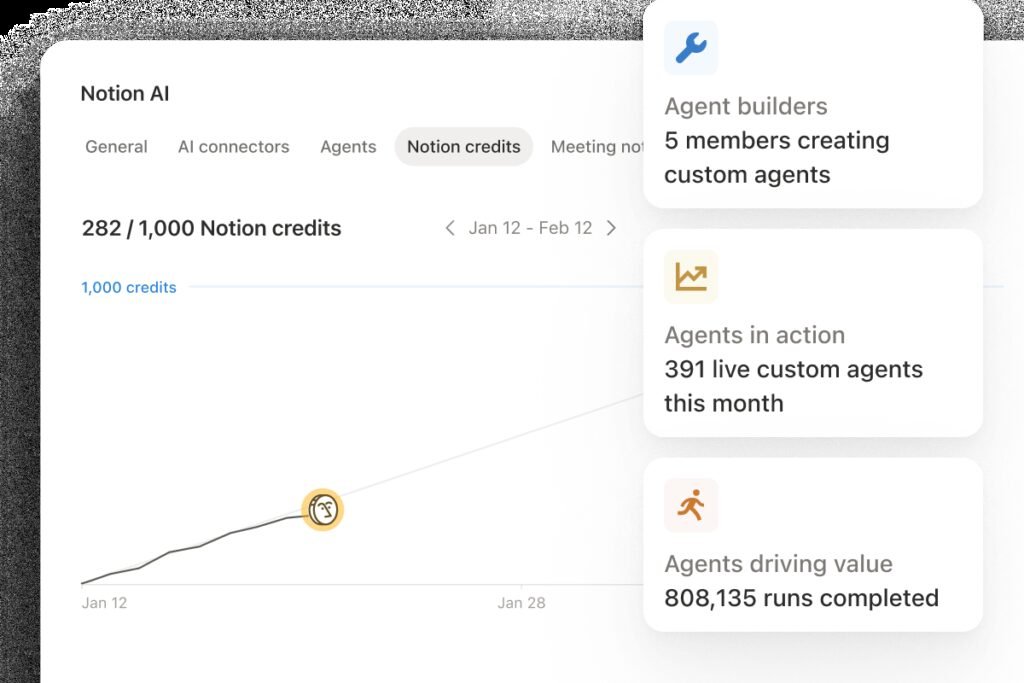
The Custom Agents admin panel, where workspace admins track credit usage. Source: Notion.
Since May 4, 2026, Custom Agents run on a separate Notion credit system layered on top of a Business or Enterprise seat: 10 dollars per 1,000 credits, shared across the whole workspace, resetting monthly with no rollover. How many credits a task uses depends on complexity, a simple task uses few, a complex multi-step workflow uses more. Admins get real-time usage tracking and alerts at 80 and 100 percent of a credit allotment, a genuinely useful control for a small business trying to avoid a surprise bill, but it is still a third cost line on top of the per-seat Business price, not included in it.
Pros and Cons
Pros
- Genuinely one of the best-reviewed products in this category, 4.6 to 4.7/5 across more than 4,000 verified reviews, without the sharp support-related collapse seen in several AI tools
- Notion Agent and Custom Agents are real, working automation, not a bolted-on chatbot, backed by real internal usage numbers Notion has disclosed
- A native MCP server and broad partner integration list (Slack, Gmail, Linear, Figma, HubSpot, GitHub, and more) make agents genuinely useful across a business’s existing tools
- Specific, real prompt-injection protections for agents that read external content, not just a generic security promise
- Contractual agreements prohibit AI subprocessors from training on customer data, and Enterprise gets zero data retention
- The underlying block-based flexibility means one workspace can genuinely replace several specialized apps
Cons
- The block-based system carries a real, widely-documented learning curve; expect a genuine time investment before it pays off
- Full AI access now requires the Business plan at $20/user/mo annual, a real price jump from the $10 Plus tier that only gets a limited trial
- Custom Agents add a separate, usage-based credit cost on top of Business seats, a third line item to budget rather than a flat included feature
- Performance measurably degrades in very large workspaces, slower search and page loads as databases and nested pages grow
- The old, cheaper standalone AI add-on is gone for new customers, a real cost increase versus how Notion AI used to be sold
Comparisons
Notion AI vs. ChatGPT
| Notion AI (Business) | ChatGPT Business | |
|---|---|---|
| Starting price for full AI | $20/user/mo (Business, annual) | $8/user/mo (ChatGPT Business, annual) |
| Standout strength | A unified workspace where agents act directly on your own docs and databases | Broadest general-purpose feature set, works without an existing workspace to plug into |
| Best for | Teams that already organize work in Notion and want agents acting on that structure | General-purpose writing, research, and task automation with no workspace prerequisite |
Bottom line: our ChatGPT review found a broader, more flexible general-purpose assistant at a lower entry price. Notion AI’s advantage only shows up if your team already lives inside Notion, since its agents act with direct knowledge of your existing docs, databases, and structure rather than starting from a blank slate.
Notion AI vs. Confluence and Asana
Notion’s flexibility is also what makes it harder to onboard than a purpose-built tool like Confluence (wikis) or Asana (task management), both of which hand you a working structure on day one. Notion trades that initial simplicity for the ability to build exactly the system your team needs, once someone puts in the setup time.
Security and Privacy
Per Notion’s own published policy, the company has contractual agreements with its AI subprocessors that prohibit using customer data to train their models, and Enterprise customers get zero data retention. Security practices are validated by SOC 2 and ISO certifications, including threat modeling and continuous testing. For agents specifically, Notion has built dedicated prompt-injection protections: enhanced detection of hidden commands in uploaded files, a flag on suspicious links requiring user approval, and admin control over what external content an agent can act on.
Access control is genuinely granular: Notion Agent inherits the permissions of the person using it, while Custom Agents get their own page-level and app-level permissions, configured individually, similar to how you would scope a new employee’s access. Every agent run is logged with a full audit trail, and changes remain reversible through Notion’s existing version history, a real, structural safeguard rather than a policy promise.
Customer Support
Documentation: an extensive help center, an academy with structured courses, active community forums, and a template marketplace covering common workflows and setups.
Independent reputation: genuinely strong. G2 and Capterra both sit in the 4.6 to 4.7 out of 5 range across a very large review base, and unlike several other AI tools reviewed on this site, we did not find a matching sharp collapse on Trustpilot. The real, recurring complaint pattern instead centers on the learning curve and on performance in very large workspaces, not on support responsiveness or billing disputes.
To manage the risk: budget real setup time before expecting Notion to feel simple, and if your workspace is growing into hundreds of database entries and nested pages, plan for a structure review rather than assuming performance will hold steady indefinitely.
Common Mistakes
- Buying Plus expecting full AI access, then discovering it is only a limited trial that gets throttled with use.
- Treating Custom Agent credits as included in the Business seat price rather than a separate, usage-based cost that needs its own budget.
- Letting a workspace grow into hundreds of nested pages and database entries without a periodic structure review, then being surprised when search and load times degrade.
- Rolling Notion out to a team with no onboarding plan, given how consistently the learning curve is cited as the top adoption barrier.
- Giving a Custom Agent broad workspace permissions by default instead of scoping page-level and app-level access deliberately.
Expert Tips
- Start with one or two Custom Agent templates (a Q&A agent or a status-reporting agent) rather than trying to automate everything on day one.
- Monitor Notion credit usage from the admin dashboard early, using the built-in 80 and 100 percent alerts to avoid a surprise bill.
- Budget real onboarding time, a short structured setup session, before expecting a team to adopt Notion smoothly.
- Periodically review and prune very large databases, since performance is a documented, real concern at scale rather than a rare edge case.
- Scope Custom Agent permissions deliberately, page by page and app by app, rather than granting broad default access.
Frequently Asked Questions
Is Notion AI free?
Only a limited trial. Free and Plus plans get restricted AI access that Notion says gets throttled after heavy use. Full, unlimited Notion AI requires the Business plan at $20/user/mo annual or Enterprise.
How much does Notion AI cost in 2026?
Business plan pricing is $20/user/mo billed annually ($24 monthly), which includes Notion Agent, AI Meeting Notes, and Enterprise Search. Custom Agents cost extra: $10 per 1,000 Notion credits, shared across the workspace. Confirm current pricing at notion.com/pricing.
Did Notion get rid of its cheap AI add-on?
Yes. The standalone AI add-on, once available for roughly $8 to $10 a month on any plan, was retired for new customers in 2026. Existing subscribers were grandfathered in, but new buyers must use Business or Enterprise for full AI access.
Is Notion good for small businesses?
Yes, particularly for teams that already use Notion for documentation and knowledge management. The tradeoff is a real setup time investment; Notion rewards teams willing to build their own structure rather than adopt a predefined one.
What is the difference between Notion Agent and Custom Agents?
Notion Agent is a personal, on-demand assistant included with any AI plan. Custom Agents are team-wide automations that run continuously on schedules or triggers, available only on Business and Enterprise, billed separately through Notion credits.
Is Notion reliable?
Yes, by most measures. G2 and Capterra both show ratings in the 4.6 to 4.7 range across a very large review base, without the sharp support-related collapse seen in some competing AI tools. The most consistent complaints are about the learning curve and performance in very large workspaces.
Final Verdict
The short version of this Notion AI review: Notion earns its strong reputation honestly: a genuinely flexible workspace, backed by real enterprise adoption, that has managed a hard pivot toward AI agents without losing what made it popular in the first place. Notion Agent and Custom Agents are real, working automation with disclosed usage numbers behind them, not a chatbot bolted on for a press release, and the security and permission model around agents is more specific and structural than most competitors offer.
The honest complication is cost and complexity moving in the same direction at once. Full AI access now costs more than it used to, since the cheap standalone add-on is gone, and Custom Agents add a third, usage-based cost on top of a Business seat. Combine that with a learning curve every independent review source flags as the top adoption barrier, and Notion in 2026 asks more of a small business, in both money and setup time, than it did two years ago.
Who should buy it: a small business already using Notion for documentation and knowledge management, ready to invest real setup time to build agents around that existing structure.
Who should look elsewhere first: a team that wants AI value on day one with no setup curve, or one unwilling to budget a separate, usage-based cost on top of a per-seat price for Custom Agents.
Sources and References
Notion, official pricing and product pages, notion.com
Notion: Meet your 24/7 AI team (Custom Agents), notion.com/product/agents
Notion: Introducing Notion 3.0 and Notion 3.3 release notes, notion.com/releases
G2 and Capterra: Notion review aggregation
Contrary Research: Notion Business Breakdown and Founding Story
eesel AI, UserJot, Lifestack, get-alfred.ai: Notion 2026 pricing analysis
ReviewSavvyHub: Notion 2,500+ user review sentiment analysis