
On this page
- Indexed vs. Ranked
- Step 1: Check You Haven’t Blocked Search Engines
- Step 2: Check Your robots.txt File
- Step 3: Submit and Verify Your Sitemap
- Step 4: Check for Accidental Noindex Tags
- Step 5: Manually Request Indexing
- Step 6: Build Real Internal Links
- Step 7: Earn Real Backlinks
- How Long Does It Actually Take?
- Frequently Asked Questions
- Sources and References

If you want to get your website indexed by Google, the honest starting point is this: there is no button that forces it, and anyone selling you an instant-indexing trick is selling you something that stopped working years ago. What actually works is a specific, checkable sequence of technical steps, plus patience while Google’s own crawlers do their job. This guide walks through exactly how to get your website indexed by Google, step by step, based on real diagnostic work, not guesswork.
Indexed vs. Ranked
Before anything else, it helps to separate two things people often confuse. “Indexed” means Google has crawled a page and added it to its index at all, regardless of how well it performs. “Ranked” means where that page shows up for a specific search. A page can be fully indexed and still rank on page nine for every relevant term. If you want to get your website indexed by Google, that is a prerequisite for ranking, not the same goal, and conflating the two leads to a lot of wasted effort chasing the wrong fix.
A walkthrough of index coverage status in Search Console. Source: Google Search Console Training (YouTube).
Step 1: Check You Haven’t Blocked Search Engines Yourself
Before anything else, rule out the simplest possible cause. Most WordPress sites have a setting under Settings → Reading called “Search Engine Visibility,” with a checkbox labeled “Discourage search engines from indexing this site.” If that box is checked, WordPress injects a site-wide instruction telling every search engine to stay away, and no other step in this guide will matter until it’s unchecked. It sounds too simple to be a real problem, but it’s one of the most common reasons a site never gets indexed at all, especially right after a migration or a theme change.
Step 2: Check Your robots.txt File
Your robots.txt file, found at yourdomain.com/robots.txt, tells search engines which parts of your site they’re allowed to crawl. A healthy file should NOT contain a blanket Disallow: / rule, which would block your entire site. It’s normal and fine to see specific disallow rules for admin areas or checkout pages. What you want to confirm is that your actual content pages, posts, and important category pages aren’t caught in a disallow rule by accident, and that your sitemap URL is listed at the bottom of the file.
Step 3: Submit and Verify Your Sitemap
Your XML sitemap is the map you hand Google of every page you want considered for indexing. If you use Yoast SEO, this is automatically generated at yourdomain.com/sitemap_index.xml. Open it and confirm it loads without errors, and that it actually lists your real content, not just placeholder pages. Then submit that exact URL inside Google Search Console under Sitemaps. A sitemap doesn’t guarantee indexing on its own, but a missing or broken one is a real, common reason new pages take far longer to get discovered.
Step 4: Check for Accidental Noindex Tags
Every individual page can carry its own instruction, separate from robots.txt, via a meta robots tag in the page’s HTML head. If a page has anywhere in its source, Google will not index that specific page even if everything else is perfect. This can happen by accident through an SEO plugin’s per-page settings, a theme default, or a setting that got copied when duplicating a page. If one specific page refuses to get indexed while others on the same site are fine, this is usually where the answer is hiding.
Step 5: Manually Request Indexing for Important Pages
Once the technical basics check out, the most direct way to get your website indexed by Google for a specific page is Google Search Console’s URL Inspection tool. Paste the exact URL, wait for Google to check its current status, and click “Request Indexing” if it hasn’t been crawled yet. This is a real, manual, one-URL-at-a-time process, not something that can be automated or bulk-submitted, and it requires your own Google account login. It’s worth doing for your newest or most important pages rather than waiting entirely on passive crawling.
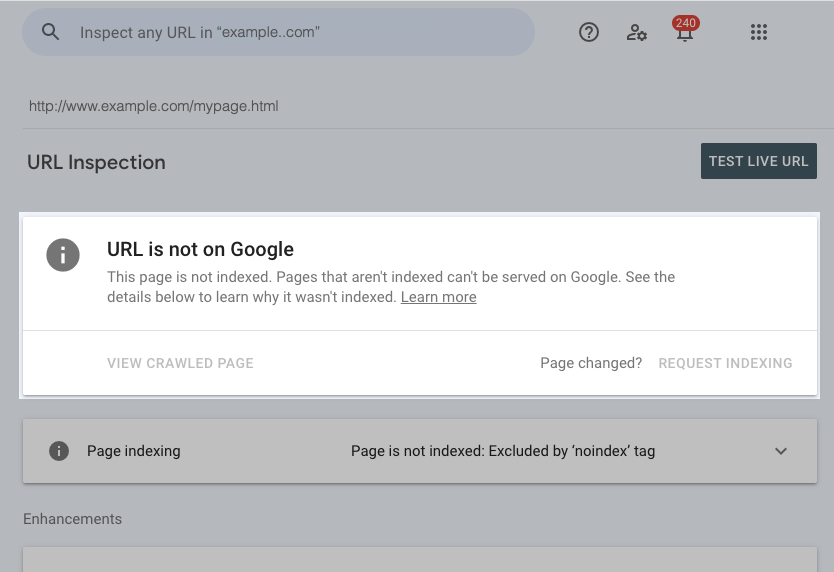
The URL Inspection tool’s overall page status card. Source: Google Search Console Help.
How to use the URL Inspection tool, step by step. Source: Google Search Console Training (YouTube).
Step 6: Build Real Internal Links
Google finds new pages by following links, including links from other pages on your own site. A new post that isn’t linked from anywhere else, sometimes called an orphan page, is genuinely harder for Google to discover, sitemap or not. Link to new content from relevant older posts, and make sure your navigation and category pages surface everything you actually want indexed. This is one of the few genuinely free, fully within-your-control levers you have, and it compounds: every new page you link internally makes the next one easier to find too.
Step 7: Earn Real Backlinks
Google prioritizes crawling pages that already have some signal of importance, and a link from another real site is the clearest signal there is. This matters most for genuinely new or low-authority sites, where Google has less reason to crawl frequently or deeply on its own. There is no shortcut here that holds up: guest posts, real partnerships, and content worth linking to are what actually move this number, not directories or link farms, which search engines have gotten very good at discounting entirely.
How Long Does It Actually Take?
For an established site with good internal linking and existing authority, new pages can get indexed within hours to a few days. For a new or low-authority site, it can genuinely take weeks, and manually requesting indexing for a handful of pages does not fix that gap on its own. If you’ve gone through every step above and pages still are not indexed after several weeks, the underlying issue is usually thin authority and limited crawl priority, not a hidden technical setting still left to find.
Frequently Asked Questions
How do I check if my website is indexed by Google at all?
Search Google directly for site:yourdomain.com. If pages appear, at least some of your site is indexed. If nothing appears, work through the steps in this guide starting with your Search Engine Visibility setting.
Does submitting a sitemap guarantee indexing?
No. A sitemap tells Google what exists and helps it discover pages faster, but it does not guarantee any specific page gets indexed or ranked.
Can I pay to get indexed faster?
No legitimate service can pay Google directly for indexing. Be skeptical of any tool promising guaranteed or instant indexing for a fee.
Why is only one page on my site not getting indexed?
This usually points to a page-specific issue: an accidental noindex tag, a canonical tag pointing elsewhere, or the page being an orphan with no internal links pointing to it.
Once your pages are indexed, the next steps are earning real traffic and links: see our Organic Traffic guide and Backlinks guide for what to do next.


Start the discussion